The Middleware System: Analytics, Guardrails, and Custom Pipelines
Build production-grade AI pipelines with NeuroLink's middleware system. Add analytics tracking, content guardrails, and custom processing to any LLM.
Every generate() call in production needs the same boilerplate: timing, token counting, PII filtering, content safety checks, and audit logging. Copy that logic into every endpoint by hand and every copy drifts slightly from the others – the maintenance cost compounds with each new endpoint added.
The middleware system is the fix. NeuroLink wraps the language model itself using its own wrapLanguageModel implementation – a local reimplementation of the AI SDK’s middleware-wrapping pattern, so the core no longer depends on the ai package – so analytics, guardrails, and evaluation run transparently on both generate() and stream() with zero application code changes. A priority-based chain ensures correct execution order, while a registry handles registration and conditional application. The factory falls back to the original model if setup fails while assembling or wrapping the chain; once generation starts, runtime hook errors propagate unless the middleware catches them internally.
This deep dive covers the full architecture: the MiddlewareFactory and MiddlewareRegistry, all four built-in middleware (lifecycle at priority 110, analytics at 100, and guardrails and auto-evaluation at 90), the custom middleware interface, conditional application by provider or model, and the execution statistics that keep your pipeline observable.
Architecture overview
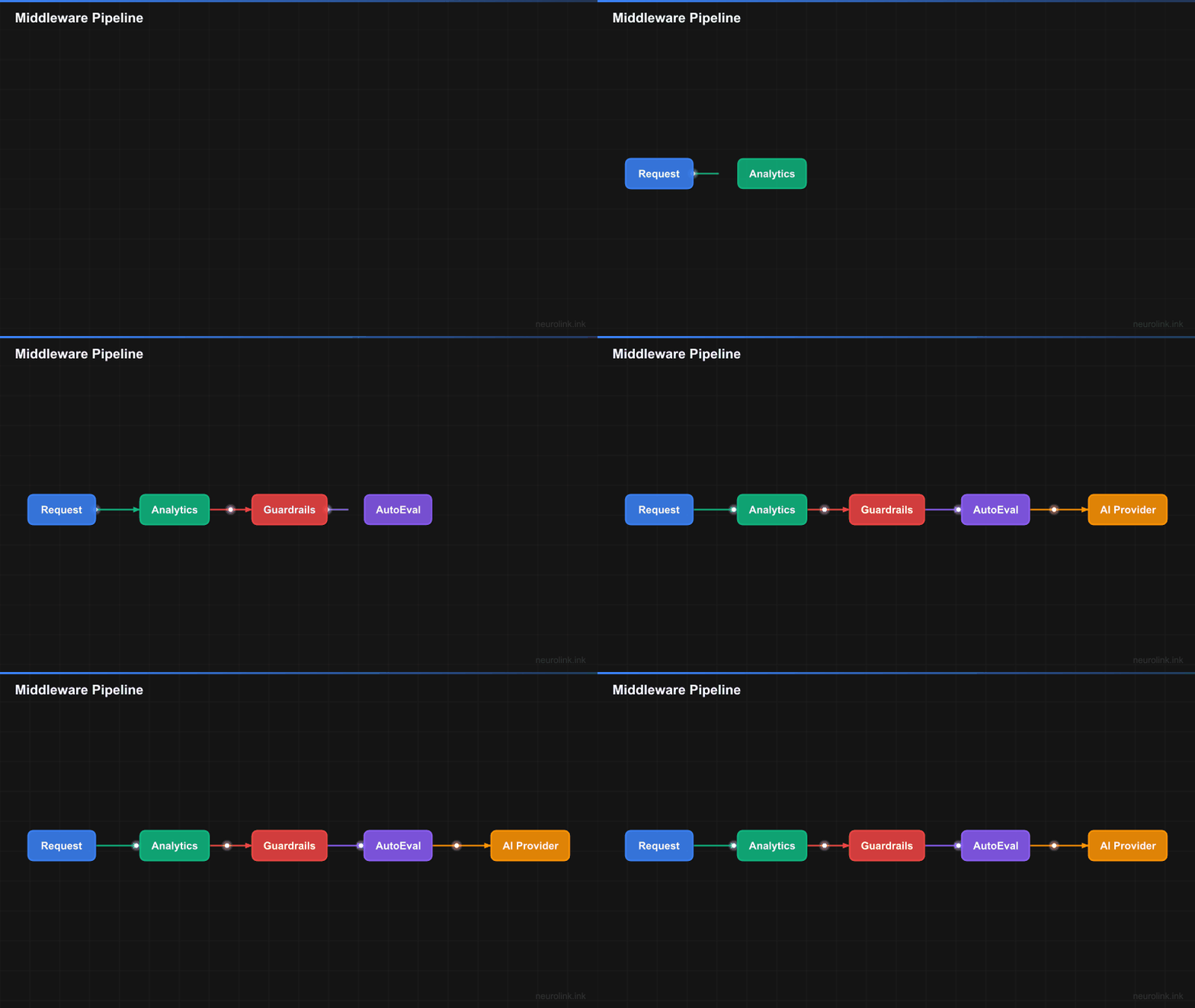
NeuroLink’s middleware system is built around two core components: the MiddlewareFactory and the MiddlewareRegistry. Together, they manage registration, configuration, chain building, and execution tracking.
flowchart LR
    A["User Request"] --> B["MiddlewareFactory"]
    B --> C["MiddlewareRegistry"]
    C --> D{"Build Chain"}
    D --> E["Lifecycle<br/>priority: 110<br/>disabled by default"]
    D --> F["Analytics<br/>priority: 100"]
    D --> G["Guardrails<br/>priority: 90"]
    D --> H["AutoEvaluation<br/>priority: 90"]
    D --> I["Custom<br/>priority: n"]
    E --> J["wrapLanguageModel"]
    F --> J
    G --> J
    H --> J
    I --> J
    J --> K["AI Provider"]
    K --> L["Response"]
Here is how the pieces fit together:
MiddlewareFactory (
factory.ts): The orchestrator. It manages the registry, applies presets, merges configurations, and ultimately callswrapLanguageModelwith the assembled middleware chain. If chain construction or model wrapping fails duringapplyMiddleware(), the factory returns the original model. That fallback does not catch errors thrown later by runtime hooks.MiddlewareRegistry (
registry.ts): The storage layer. It stores registered middleware, handles priority-based ordering, builds execution chains, and tracks execution statistics. ThebuildChain()method is where middleware are sorted by priority and filtered by conditions. Its runtime wrappers record hook failures and rethrow them.NeuroLinkMiddleware type: Every middleware extends the package’s AI SDK v3-compatible
LanguageModelMiddlewareinterface with metadata – anid,name,description,priority, anddefaultEnabledflag. This metadata drives the registry’s sorting, filtering, and reporting.Priority system: Higher priority numbers mean earlier execution in the chain. Lifecycle runs at priority 110 when explicitly enabled, analytics runs at 100, and guardrails and auto-evaluation both run at 90. Custom middleware slots in wherever you need it.
Conditional application: Middleware can specify
MiddlewareConditionsto control when they run – filter by provider, model, or a custom function. This means you can have different guardrails for different providers without if-statements in your application code.
Built-in middleware deep dive
NeuroLink registers four built-in middleware. Analytics is enabled by the default preset; guardrails and auto-evaluation are opt-in, and lifecycle is disabled by default.
Lifecycle middleware
The lifecycle middleware runs at priority 110 when enabled. It invokes onFinish, onError, and onChunk callbacks around generation and streaming lifecycle events. It is disabled by default, so applications opt in when they need callback-driven lifecycle integration.
Analytics middleware
The analytics middleware tracks token usage, response times, and model performance for every LLM call. It runs at priority 100, ahead of guardrails and auto-evaluation at priority 90. The default-disabled lifecycle middleware is the one built-in with a higher priority, at 110.
The middleware wraps both wrapGenerate and wrapStream hooks, extracting timing data and usage metrics from every response. The collected data is injected into experimental_providerMetadata.neurolink.analytics, making it available downstream without polluting the main response object.
1
2
3
4
5
6
7
8
9
10
11
import { NeuroLink } from '@juspay/neurolink';

const neurolink = new NeuroLink();
const result = await neurolink.generate({
  input: { text: "Explain middleware patterns" },
  provider: "google-ai",
  middleware: {
    preset: "default", // analytics enabled by default
  },
});
// Analytics data available in provider metadata
Because analytics runs before guardrails and auto-evaluation, the timing data it captures includes latency added by those lower-priority middleware and by any custom middleware ordered after analytics. This gives you a broader end-to-end picture than raw provider latency alone.
Note: The
"default"preset enables analytics automatically. You do not need any additional configuration to start tracking token usage and latency.
Guardrails middleware
The guardrails middleware provides three layers of content protection, each independently configurable:
1. Bad Words Filtering
The simplest layer. It matches output text against regex patterns and string lists, replacing matches with configurable replacement text (default: [REDACTED]). This is fast, deterministic, and catches known patterns like email addresses, phone numbers, and SSNs.
2. Model-Based Filtering
A more sophisticated layer that uses a separate LLM to classify content as safe or unsafe. The secondary model evaluates the primary model’s output and flags anything that violates your safety policies. Unsafe content is replaced with <REDACTED BY AI GUARDRAIL>.
3. Precall Evaluation
The most powerful layer. Before the main LLM call even happens, a secondary model evaluates the input for safety. The PrecallEvaluationResult includes an overall assessment (safe, unsafe, suspicious, or inappropriate), a safetyScore, and a suggestedAction (allow, block, sanitize, or warn). When blockUnsafeRequests is enabled, dangerous prompts never reach the primary model.
1
2
3
4
5
6
7
8
9
10
11
12
13
14
15
16
17
18
19
20
21
22
const result = await neurolink.generate({
  input: { text: userInput },
  provider: "google-ai",
  middleware: {
    middlewareConfig: {
      guardrails: {
        enabled: true,
        config: {
          badWords: {
            enabled: true,
            regexPatterns: ["\\b[\\w.-]+@[\\w.-]+\\.\\w+\\b"],
            replacementText: "[REDACTED]",
          },
          precallEvaluation: {
            enabled: true,
            blockUnsafeRequests: true,
          },
        },
      },
    },
  },
});
The guardrails middleware applies to both wrapGenerate and wrapStream. For streaming responses, it filters each chunk as it arrives, so unsafe content is caught in real-time rather than only after the full response is assembled.
Note: Guardrails run at priority 90, which means analytics has already started its timer before guardrails execute. The latency added by precall evaluation will be captured in your analytics data.
Auto-evaluation middleware
The auto-evaluation middleware performs one RAGAS-style quality assessment of each response. It scores outputs on relevance, accuracy, and completeness, and makes the result available through onEvaluationComplete.
Set threshold to determine the evaluation result’s isPassing value. For non-streaming generation, blocking controls whether NeuroLink waits for evaluation and propagates evaluator errors; it does not block or retry a response merely because its score is below the threshold. Streaming evaluation remains non-blocking from the caller’s perspective.
This middleware is covered in depth in a dedicated post on model evaluation and scoring. For now, know that it runs at priority 90 (registered after guardrails, so it still executes later in the chain) and integrates with the analytics and guardrails middleware above it.
Presets: quick configuration
Configuring middleware individually for every request is tedious. NeuroLink solves this with presets – named configurations that bundle middleware settings together.
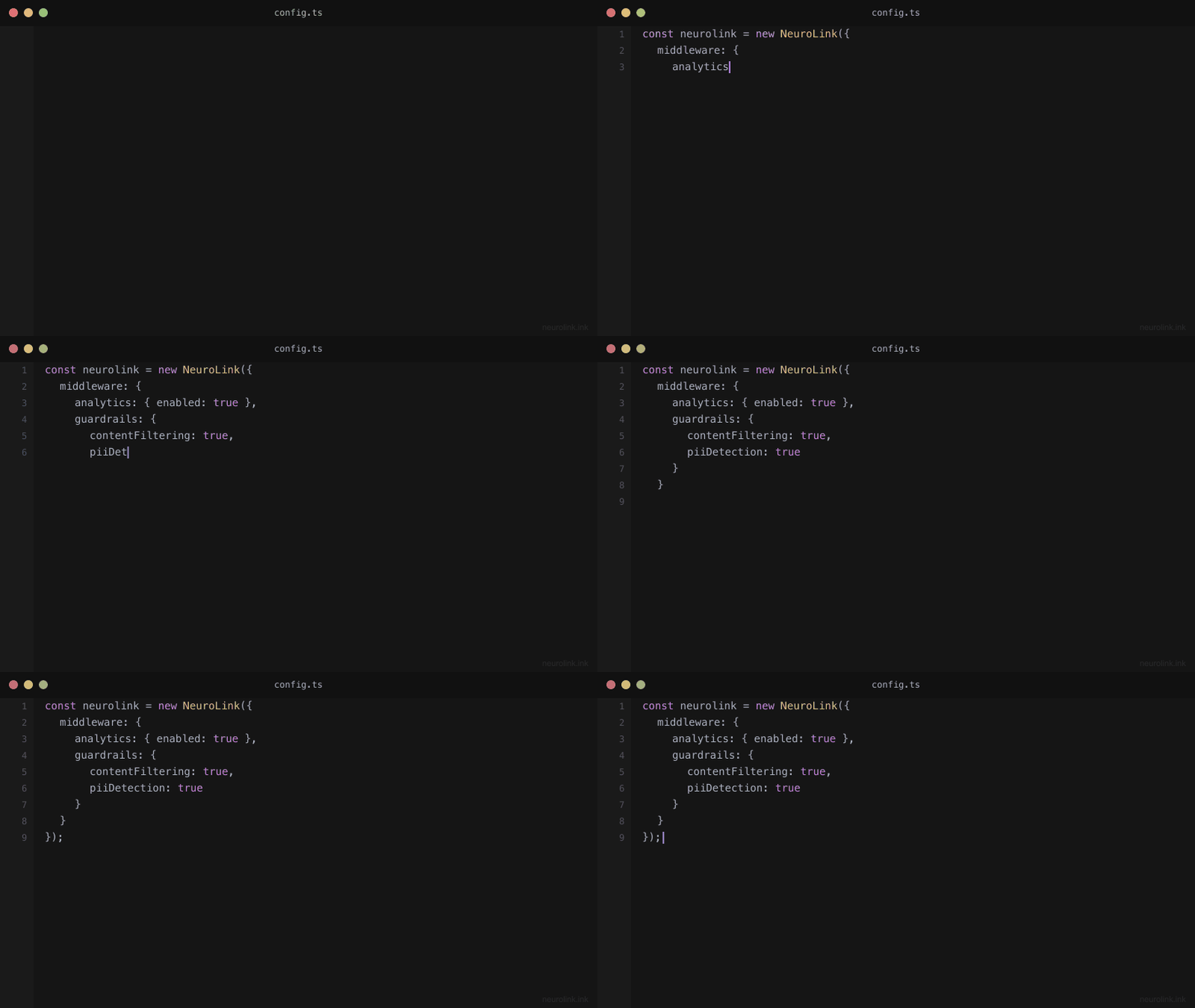
Three built-in presets are registered during MiddlewareFactory.initialize():
| Preset | Middleware Enabled | Use Case |
|---|---|---|
"default" | Analytics only | Development, basic monitoring |
"all" | Analytics + Guardrails | User-facing applications |
"security" | Guardrails only | Security-focused pipelines |
You can also register custom presets for your specific needs:
1
2
3
4
5
6
7
8
9
10
11
12
13
14
15
16
17
18
19
20
21
22
23
24
25
26
import { MiddlewareFactory } from '@juspay/neurolink';

const factory = new MiddlewareFactory();

// Use built-in preset
factory.applyMiddleware(model, context, { preset: "security" });

// Register custom preset
factory.registerPreset({
  name: "production",
  description: "Full production configuration",
  config: {
    analytics: { enabled: true },
    guardrails: {
      enabled: true,
      config: { precallEvaluation: { enabled: true } },
    },
    autoEvaluation: {
      enabled: true,
      config: {
        threshold: 7,
        blocking: true,
      },
    },
  },
});
Preset values serve as defaults. If you specify explicit middlewareConfig values alongside a preset, the explicit values take precedence. This lets you start with a preset and override specific settings per-request without duplicating the entire configuration.
Writing custom middleware
The built-in middleware covers common concerns, but every production application has unique requirements. NeuroLink’s middleware interface is designed to make custom middleware straightforward to write and register.
Custom middleware lifecycle
sequenceDiagram
    participant App
    participant Factory as MiddlewareFactory
    participant Registry as MiddlewareRegistry
    participant Chain as Middleware Chain
    participant LLM as AI Provider

    App->>Factory: register(customMiddleware)
    Factory->>Registry: register(middleware, options)
    App->>Factory: applyMiddleware(model, context)
    Factory->>Registry: buildChain(context, config)
    Registry-->>Factory: sorted middleware[]
    Factory->>Chain: wrapLanguageModel(model, chain)
    Chain->>LLM: transformParams -> doGenerate -> result
    LLM-->>Chain: response
    Chain-->>App: enhanced response
Implementing the interface
A custom middleware implements the NeuroLinkMiddleware interface, which consists of a metadata object and up to three optional hook functions:
transformParams: Modify request parameters before they are sent to the provider. This is the right place to inject system prompts, modify temperature, add metadata, or sanitize inputs.wrapGenerate: Wrap the synchronous generation call. You get access todoGenerate()(the function that calls the next middleware or the provider) andparams. Use this for timing, caching, logging, or response transformation.wrapStream: Wrap the streaming generation call. Same pattern aswrapGeneratebut for streaming responses.
Here is a complete example of a logging middleware:
1
2
3
4
5
6
7
8
9
10
11
12
13
14
15
16
17
18
19
20
21
22
23
24
25
26
27
28
29
30
31
32
33
34
35
36
import {
  MiddlewareFactory,
  type NeuroLinkMiddleware,
} from "@juspay/neurolink";

const loggingMiddleware: NeuroLinkMiddleware = {
  specificationVersion: "v3",
  metadata: {
    id: "custom-logging",
    name: "Request Logger",
    description: "Logs all AI requests and responses",
    priority: 95, // Run after analytics but before guardrails
    defaultEnabled: true,
  },

  transformParams: async ({ params }) => {
    console.log("[LOG] Request params:", JSON.stringify(params.prompt));
    return params;
  },

  wrapGenerate: async ({ doGenerate, params }) => {
    const start = Date.now();
    const result = await doGenerate();
    console.log(`[LOG] Generated in ${Date.now() - start}ms`);
    return result;
  },

  wrapStream: async ({ doStream, params }) => {
    console.log("[LOG] Stream started");
    return doStream();
  },
};

const factory = new MiddlewareFactory({
  middleware: [loggingMiddleware],
});
Registration options
When registering custom middleware, the factory.register() method accepts options:
replace: Iftrue, replaces any existing middleware with the same ID. Useful for overriding built-in middleware.defaultEnabled: Controls whether the middleware is active by default.globalConfig: Configuration that applies to this middleware across all requests.
Conditional middleware
Not every middleware should run on every request. NeuroLink’s conditional middleware system lets you control exactly when middleware activates using the MiddlewareConditions type.
Four condition types are available:
providers[]: Only run for specific providers (e.g., only apply guardrails to OpenAI and Anthropic).models[]: Only run for specific models (e.g., extra validation for the flagship tier but not the mini tier).options{}: Match against request options.custom(context) => boolean: A function that receives the full request context and returns whether the middleware should apply.
1
2
3
4
5
6
7
8
9
10
11
12
13
14
15
16
const result = await neurolink.generate({
  input: { text: "Analyze this data" },
  provider: "anthropic",
  middleware: {
    middlewareConfig: {
      guardrails: {
        enabled: true,
        conditions: {
          providers: ["openai", "anthropic"],
          models: ["gpt-5.4", "claude-sonnet-5"],
          custom: (ctx) => ctx.session?.userId !== "admin",
        },
      },
    },
  },
});
In this example, guardrails only apply when the provider is OpenAI or Anthropic, the model is GPT-5.4 or Claude Sonnet 5, and the user is not an admin. Admin users bypass guardrails entirely – a common pattern for internal tooling.
Conditional middleware is particularly powerful in multi-tenant applications where different customers have different security requirements, or in development environments where you want to skip expensive middleware during testing.
Execution statistics and monitoring
In production, you need to know how your middleware pipeline is performing. NeuroLink tracks detailed execution statistics for every middleware in the chain.
Per-middleware metrics
The MiddlewareRegistry.getAggregatedStats() method returns metrics for each registered middleware:
totalExecutions: How many times this middleware has run.successfulExecutions: How many times it completed without error.failedExecutions: How many times it threw an exception.averageExecutionTime: Mean execution time in milliseconds.lastExecutionTime: The most recent execution time.
The registry maintains a ring buffer of the last 100 executions per middleware (implemented around line 314 of registry.ts), providing a rolling window of performance data without unbounded memory growth.
Chain-level summary
For a high-level view, MiddlewareFactory.getChainStats() aggregates metrics across the entire chain:
1
2
3
const stats = factory.getChainStats(context, config);
console.log(`Applied: ${stats.appliedMiddleware}/${stats.totalMiddleware}`);
console.log(`Total time: ${stats.totalExecutionTime}ms`);
Configuration validation
Before deploying a new middleware configuration, use MiddlewareFactory.validateConfig() to check for errors and warnings. It validates that referenced middleware exist, conditions are syntactically correct, and configuration values are within expected ranges. This catches misconfigurations at deploy time rather than at runtime.
Best practices and common pitfalls
After building and operating middleware pipelines in production, here are the patterns that work and the mistakes to avoid.
Priority ordering matters
The most common mistake is getting priority ordering wrong. Higher numbers run earlier: lifecycle is 110 when enabled, analytics is 100, and guardrails and auto-evaluation are 90. Place custom middleware according to the behavior it must surround rather than assuming it always runs last.
If you put a caching middleware at a lower priority than guardrails, cached responses will bypass safety checks. If you put analytics at a lower priority than custom middleware, your timing data will not include custom middleware latency.
Distinguish setup-time and runtime errors
MiddlewareFactory.applyMiddleware() catches errors while configuring the chain or wrapping the model and returns the original, unwrapped model. This keeps setup-time middleware failures from preventing use of the underlying model.
Once generation starts, the registry records failures from transformParams, wrapGenerate, and wrapStream, then rethrows them. A custom logger or other hook that must not fail the request should catch and handle its own runtime errors. Monitor failedExecutions in your stats to catch those issues early.
Performance considerations
Every middleware adds latency to every call. The analytics middleware adds microseconds. Bad word filtering adds milliseconds. Precall evaluation adds a full LLM round-trip – potentially seconds.
Use getChainStats() to measure your pipeline’s overhead. If middleware latency exceeds acceptable thresholds, consider:
- Disabling precall evaluation for low-risk internal endpoints
- Using conditions to skip expensive middleware for trusted users
- Moving heavy processing to async post-processing rather than inline middleware
Testing middleware
Use createContext() to build test contexts that simulate different providers, models, and user sessions. This lets you verify conditional middleware behavior without making real API calls.
Do not modify params in the wrong hook
A subtle but important rule: do not modify request parameters inside wrapGenerate or wrapStream. These hooks receive params as read-only context. If you need to modify parameters, use transformParams – that is its explicit purpose.
Conclusion
The middleware system separates infrastructure concerns from business logic. The architecture – a factory-managed, priority-ordered chain wrapping the language model – ensures that analytics, guardrails, and custom processing apply transparently to every generate() and stream() call without touching your application code.
Three entry points:
"default"preset for immediate analytics tracking"all"preset for user-facing applications needing content guardrails- Custom middleware for domain-specific processing – compliance logging, PII detection, response caching, validation
Priority ordering, explicit runtime error handling, and getChainStats() make the pipeline observable and debuggable. The middleware pipeline is what separates a prototype from a production system.
What’s next
In the next post, we dive deep into the evaluation system that powers the auto-evaluation middleware, covering RAGAS-style scoring, custom evaluation criteria, and how to build quality gates that catch regressions before they reach your users.
Related posts: