How to Build a Multi-Provider AI Agent in TypeScript (Step-by-Step)
Build a multi-provider AI agent in TypeScript that routes tasks across OpenAI, Anthropic, and Google. Step-by-step with tool calling and fallback.
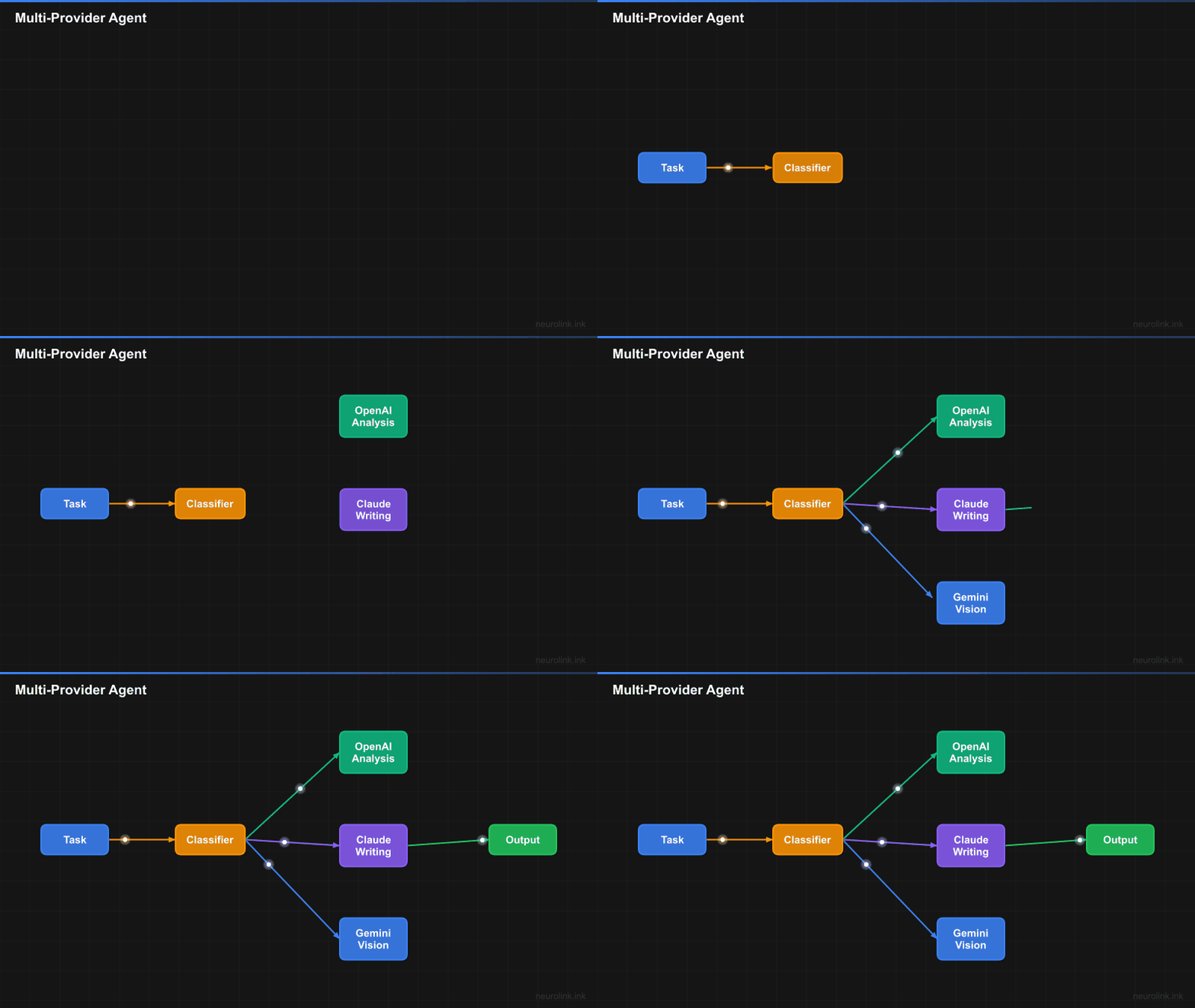
You will build a TypeScript agent that routes tasks to the best AI model – OpenAI for speed, Claude for reasoning, Gemini for multimodal – with automatic fallback when any provider fails.
By the end of this step-by-step tutorial, you will have a production-ready multi-provider agent that:
- Switches between providers per-request with a single parameter change
- Defines custom tools with Zod schemas for type-safe function calling
- Streams responses in real-time for instant user feedback
- Falls back automatically when a provider is unavailable
- Routes tasks to the optimal model based on complexity
- Runs consensus workflows for critical decisions
Let us build it.
Prerequisites and Project Setup
You need Node.js 18+ and TypeScript 5.x installed. Create a new project:
1
2
3
4
5
mkdir agent-demo && cd agent-demo
npm init -y
npm install @juspay/neurolink ai zod
npm install -D typescript @types/node
npx tsc --init
Set up your environment variables. NeuroLink auto-loads .env files:
1
2
3
OPENAI_API_KEY=sk-...
ANTHROPIC_API_KEY=sk-ant-...
GOOGLE_API_KEY=AIza...
You need at least one provider key to follow along. Two or more keys enable the fallback and multi-provider patterns.
Warning: Never commit
.envfiles to version control. Add.envto your.gitignoreimmediately.
Step 1: Initialize the NeuroLink SDK
Start by creating a single NeuroLink instance. One constructor, one generate() method, one stream() method – regardless of which provider handles the request.
1
2
3
4
5
6
7
8
9
10
11
import { NeuroLink } from "@juspay/neurolink";

const neurolink = new NeuroLink();

// Or with orchestration enabled for automatic model routing
const neurolinkWithRouting = new NeuroLink({
  enableOrchestration: true,
});

// Provider and model are specified per-request in generate()/stream() calls,
// not in the constructor.
The constructor accepts optional configuration for conversation memory, orchestration, HITL, tool registry, and observability. For now, a bare new NeuroLink() is all you need.
The key insight: provider and model are per-request parameters, not constructor parameters. This means you can route different requests to different providers without creating multiple NeuroLink instances.
Step 2: Define Custom Tools with Zod Schemas
Now you will define tools that make your agent actionable. Each tool has a description (so the LLM knows when to use it), a Zod schema (for type-safe arguments), and an execute function:
Security Warning: The
Function()constructor below is equivalent toeval(). In production, replace it with a safe math parser like mathjs (math.evaluate(expression)) to prevent arbitrary code execution from LLM-generated expressions.
1
2
3
4
5
6
7
8
9
10
11
12
13
14
15
16
17
18
19
20
21
22
23
24
25
26
27
28
29
30
31
32
33
import { z } from "zod";
import { tool } from "ai";

const searchTool = tool({
  description: "Search the knowledge base for relevant information",
  parameters: z.object({
    query: z.string().describe("Search query"),
    limit: z.number().optional().describe("Max results"),
  }),
  execute: async ({ query, limit = 5 }) => {
    // Replace with your actual search implementation
    const results = await searchDatabase(query, limit);
    return { results, count: results.length };
  },
});

const calculatorTool = tool({
  description: "Perform mathematical calculations",
  parameters: z.object({
    expression: z.string().describe("Math expression to evaluate"),
  }),
  execute: async ({ expression }) => {
    // IMPORTANT: Use mathjs in production — Function() is unsafe with LLM input
    // import { evaluate } from 'mathjs';
    // const result = evaluate(expression);
    const sanitized = expression.replace(/[^0-9+\-*/().%\s]/g, '');
    if (!sanitized) return { expression, error: "Invalid expression" };
    const result = Function(`"use strict"; return (${sanitized})`)();
    return { expression, result: String(result) };
  },
});

const tools = { search: searchTool, calculator: calculatorTool };
The .describe() method on Zod fields is important – it tells the LLM what each parameter means, improving the quality of generated arguments. Be specific: “Search query string” is better than “query.”
Step 3: Generate with Provider Switching
Now you will use the same code and tools with different providers. Switch models by changing two parameters:
1
2
3
4
5
6
7
8
9
10
11
12
13
14
15
16
17
18
19
20
21
22
23
24
25
26
27
28
29
30
// Fast task -> OpenAI GPT-4o-mini
const quickAnswer = await neurolink.generate({
  input: { text: "What is 2 + 2?" },
  provider: "openai",
  model: "gpt-4o-mini",
  tools,
});

// Reasoning task -> Anthropic Claude
const analysis = await neurolink.generate({
  input: { text: "Analyze this contract for legal risks..." },
  provider: "anthropic",
  model: "claude-sonnet-4-20250514",
  tools,
  maxTokens: 4096,
});

// Multimodal task -> Google Gemini
const imageAnalysis = await neurolink.generate({
  input: {
    text: "Describe what you see in this image",
    images: [imageBuffer],
  },
  provider: "google-ai",
  model: "gemini-2.5-flash",
});

console.log(quickAnswer.content);
console.log(analysis.content);
console.log(imageAnalysis.content);
Three observations:
The interface is identical.
generate()takes the same options regardless of provider. Theinput,tools,maxTokens, and other parameters work the same way across all providers.Tools are portable. The same
toolsobject works with OpenAI, Anthropic, and Google. NeuroLink handles the provider-specific tool calling formats internally.Multimodal is built in. The
imagesfield in the input enables vision capabilities on providers that support it. No special configuration required.
Step 4: Add Automatic Fallback
Next, you will add automatic failover. When OpenAI is down, your agent falls back to Anthropic or Google instead of returning an error.
1
2
3
4
5
6
7
8
9
10
11
12
13
14
15
16
17
18
19
20
21
22
23
24
import { createAIProviderWithFallback } from "@juspay/neurolink";

// Primary: OpenAI, Fallback: Vertex AI
const { primary, fallback } = await createAIProviderWithFallback(
  "openai",
  "vertex"
);

async function resilientGenerate(prompt: string) {
  try {
    return await neurolink.generate({
      input: { text: prompt },
      provider: "openai",
      tools,
    });
  } catch (error) {
    console.warn("Primary provider failed, using fallback:", error.message);
    return await neurolink.generate({
      input: { text: prompt },
      provider: "vertex",
      tools,
    });
  }
}
The createAIProviderWithFallback() function from @juspay/neurolink sets up a primary/fallback pair with built-in circuit breaker logic. After repeated failures on the primary, requests are routed directly to the fallback without even attempting the primary – reducing latency during outages.
For more sophisticated fallback strategies, use NeuroLink’s CircuitBreaker class with configurable failure thresholds and cooldown periods.
Step 5: Stream Responses in Real Time
Now you will add streaming so users see text appearing word by word instead of waiting 5-10 seconds for a complete response.
1
2
3
4
5
6
7
8
9
10
11
12
13
14
15
16
17
18
const result = await neurolink.stream({
  input: { text: "Write a comprehensive guide to TypeScript generics" },
  provider: "openai",
  model: "gpt-4o",
  tools,
  temperature: 0.7,
  maxTokens: 2000,
});

for await (const chunk of result.stream) {
  if ("content" in chunk) {
    process.stdout.write(chunk.content);
  }
}

// Access analytics after stream completes
const analytics = await result.analytics;
console.log("Token usage:", analytics?.providerAnalytics?.tokenUsage);
The result.stream async iterable yields typed chunks. Text chunks have type: "text" and a content field. Tool call chunks and other event types are also available for advanced use cases.
After the stream completes, result.analytics provides token usage, latency, and other metrics. This data is available even for streaming requests, though it is only complete after the stream finishes.
Step 6: Smart Model Routing
Instead of manually choosing a provider for every request, you will enable automatic routing. NeuroLink’s ModelRouter classifies prompts by complexity and selects the optimal model:
1
2
3
4
5
6
7
8
9
10
11
12
13
14
15
// Enable orchestration for automatic routing
const neurolink = new NeuroLink({
  enableOrchestration: true,
});

// NeuroLink automatically classifies and routes:
// Simple prompts -> fast model (gemini-2.5-flash)
// Complex prompts -> reasoning model (claude-sonnet-4)

const result = await neurolink.generate({
  input: { text: "Design a distributed caching architecture" },
  // No provider specified -- NeuroLink routes automatically
});

console.log("Routed to:", result.provider, result.model);
The ModelRouter uses a BinaryTaskClassifier to determine prompt complexity. Simple prompts (questions, classifications, formatting) route to the fast tier. Complex prompts (analysis, planning, multi-step reasoning) route to the reasoning tier.
The routing configuration uses two tiers from MODEL_CONFIGS:
| Tier | Models | Avg Latency | Cost |
|---|---|---|---|
| Fast | Gemini 2.5 Flash, GPT-4o-mini | ~800ms | Low |
| Reasoning | Claude Sonnet 4, GPT-4o | ~3000ms | Higher |
This achieves the best of both worlds: fast responses for simple tasks and high-quality responses for complex ones, with cost savings of 60% or more compared to routing everything through reasoning models.
Architecture overview
flowchart TD
    A[User Prompt] --> B[NeuroLink SDK]
    B --> C{ModelRouter}
    C -->|Simple Task| D[Fast Tier]
    C -->|Complex Task| E[Reasoning Tier]
    D --> F[Gemini 2.5 Flash]
    D --> G[GPT-4o-mini]
    E --> H[Claude Sonnet 4]
    E --> I[GPT-4o]
    F --> J[Tool Execution]
    G --> J
    H --> J
    I --> J
    J --> K[Streamed Response]
Step 7: Consensus Workflows for Critical Decisions
For high-stakes decisions, you will run multiple models in parallel and let a judge select the best response:
1
2
3
4
5
6
7
8
9
10
import { CONSENSUS_3_WORKFLOW } from "@juspay/neurolink";

const result = await neurolink.generate({
  input: { text: "Should we migrate from PostgreSQL to DynamoDB?" },
  workflowConfig: CONSENSUS_3_WORKFLOW,
});

console.log("Best response:", result.content);
console.log("Selected model:", result.workflow?.selectedModel);
console.log("Workflow time:", result.workflow?.metrics?.totalTime);
The CONSENSUS_3_WORKFLOW runs three models (from different providers) on the same prompt. A judge model evaluates the responses and selects the best one based on quality, accuracy, and completeness. This is expensive (3x the cost of a single call) but provides higher confidence for critical decisions.
Other built-in workflows include QUALITY_MAX_WORKFLOW for maximum quality and adaptive workflows that adjust strategy based on task characteristics.
Complete agent code
Here is the full agent combining all the patterns into a single file:
Security Warning: The
Function()constructor below is equivalent toeval(). In production, replace it with a safe math parser like mathjs (math.evaluate(expression)) to prevent arbitrary code execution from LLM-generated expressions.
1
2
3
4
5
6
7
8
9
10
11
12
13
14
15
16
17
18
19
20
21
22
23
24
25
26
27
28
29
30
31
32
33
34
35
36
37
38
39
40
41
42
43
44
45
46
47
48
49
50
51
52
53
54
55
56
57
58
59
60
61
62
63
import { NeuroLink } from "@juspay/neurolink";
import { z } from "zod";
import { tool } from "ai";

// Define tools
const tools = {
  search: tool({
    description: "Search for information",
    parameters: z.object({
      query: z.string().describe("Search query"),
    }),
    execute: async ({ query }) => {
      // Your search implementation
      return { results: [`Result for: ${query}`] };
    },
  }),
  calculator: tool({
    description: "Perform calculations",
    parameters: z.object({
      expression: z.string().describe("Math expression"),
    }),
    execute: async ({ expression }) => {
      // IMPORTANT: Use mathjs in production — Function() is unsafe with LLM input
      // import { evaluate } from 'mathjs';
      // const result = evaluate(expression);
      const sanitized = expression.replace(/[^0-9+\-*/().%\s]/g, '');
      if (!sanitized) return { expression, error: "Invalid expression" };
      const result = Function(`"use strict"; return (${sanitized})`)();
      return { expression, result: String(result) };
    },
  }),
};

// Initialize with smart routing
const neurolink = new NeuroLink({
  enableOrchestration: true,
});

// Generate with automatic provider selection
async function agentGenerate(prompt: string) {
  try {
    const result = await neurolink.stream({
      input: { text: prompt },
      tools,
    });

    for await (const chunk of result.stream) {
      if ("content" in chunk) {
        process.stdout.write(chunk.content);
      }
    }

    console.log("\n---");
    const analytics = await result.analytics;
    console.log("Provider:", analytics?.provider);
    console.log("Tokens:", analytics?.providerAnalytics?.tokenUsage);
  } catch (error) {
    console.error("Agent error:", error.message);
  }
}

// Run the agent
await agentGenerate("What is the square root of 144? Use the calculator tool.");
Production checklist
Before deploying your multi-provider agent to production:
- Set timeouts per provider: Use the
timeoutoption in generate/stream calls to prevent hanging requests. - Monitor token usage and costs: Use NeuroLink’s analytics middleware to track per-request costs across providers.
- Enable observability: Initialize OpenTelemetry with
initializeOpenTelemetry()for distributed tracing across the full agent execution. - Configure conversation memory: For multi-turn agents, enable Redis-backed memory for persistence.
- Add HITL for dangerous tools: Use
dangerousActionsto require human approval for sensitive operations. - Test with multiple providers: Verify your agent works correctly with each provider you plan to use. Tool calling behavior can vary.
- Pin model versions: Use specific model versions (e.g.,
claude-sonnet-4-20250514) rather than aliases in production.
What you built and What’s Next
You built a multi-provider AI agent with tool calling, streaming, automatic failover, smart routing, and consensus workflows. From here, explore:
- Building RAG Applications with NeuroLink SDK for retrieval-augmented generation
- LLM Cost Optimization Strategies for advanced cost optimization strategies
- Building AI Agents with NeuroLink for the complete agent architecture guide
- AI Application Security Checklist for securing your agent in production
Related posts: