What is NeuroLink? The Unified AI SDK Explained
NeuroLink is a unified AI SDK supporting 13+ providers, MCP tools, streaming, RAG, and enterprise features. Learn how it simplifies AI development.
You’ve heard about NeuroLink but aren’t sure where to start. Let’s fix that.
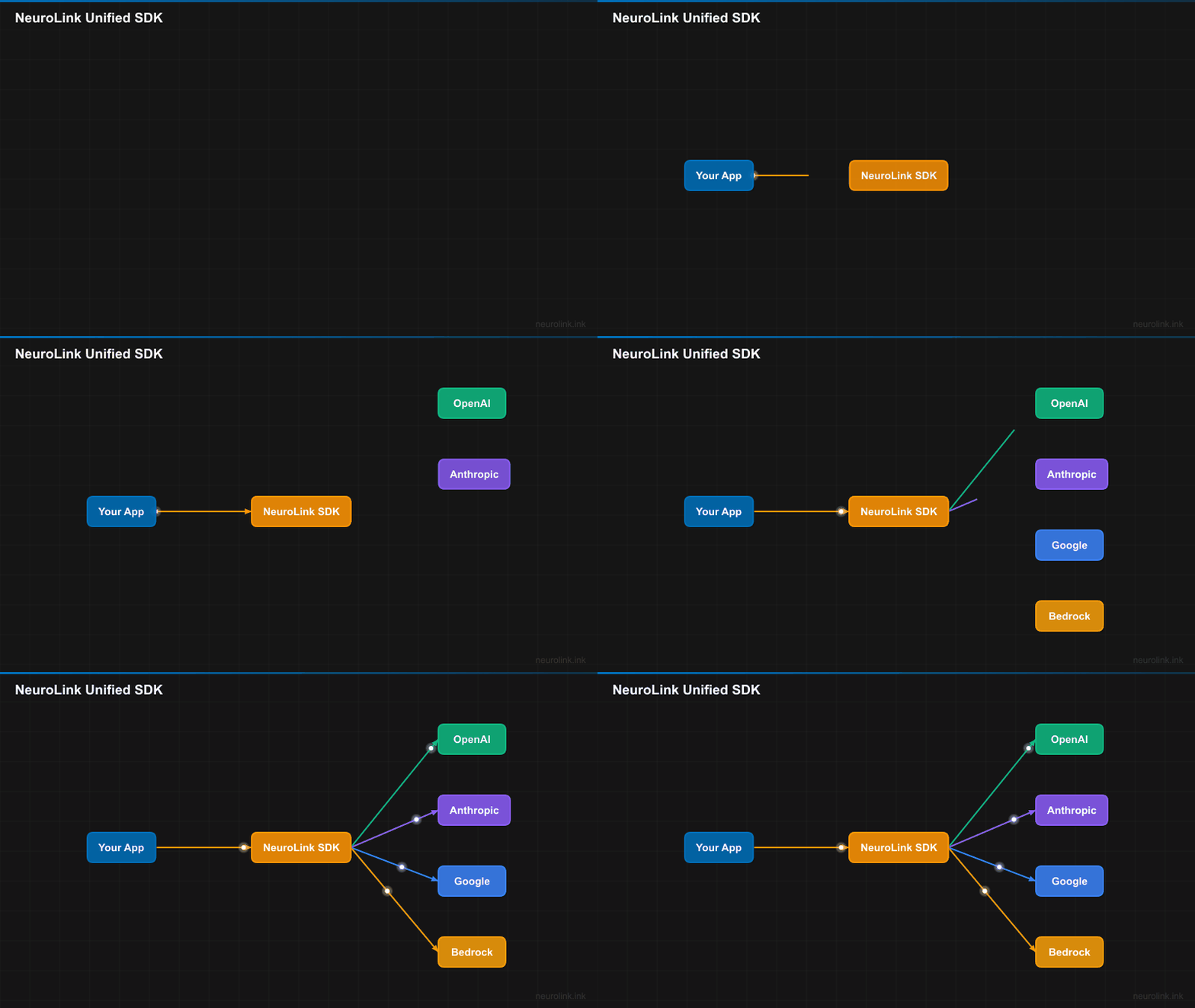
Imagine you want to use AI in your app – maybe OpenAI today, maybe Google’s Gemini tomorrow. Normally, that means learning two completely different SDKs, rewriting your code, and dealing with different error messages. NeuroLink is a single toolkit that lets you talk to all of them the same way. Think of it like a universal remote for AI providers.
NeuroLink (@juspay/neurolink) is an open-source AI SDK built by Juspay. It gives you one TypeScript API that works with 13+ AI providers, so you can focus on building your app instead of wrestling with provider differences.
In this post, you will learn:
- The core architecture and design philosophy behind NeuroLink
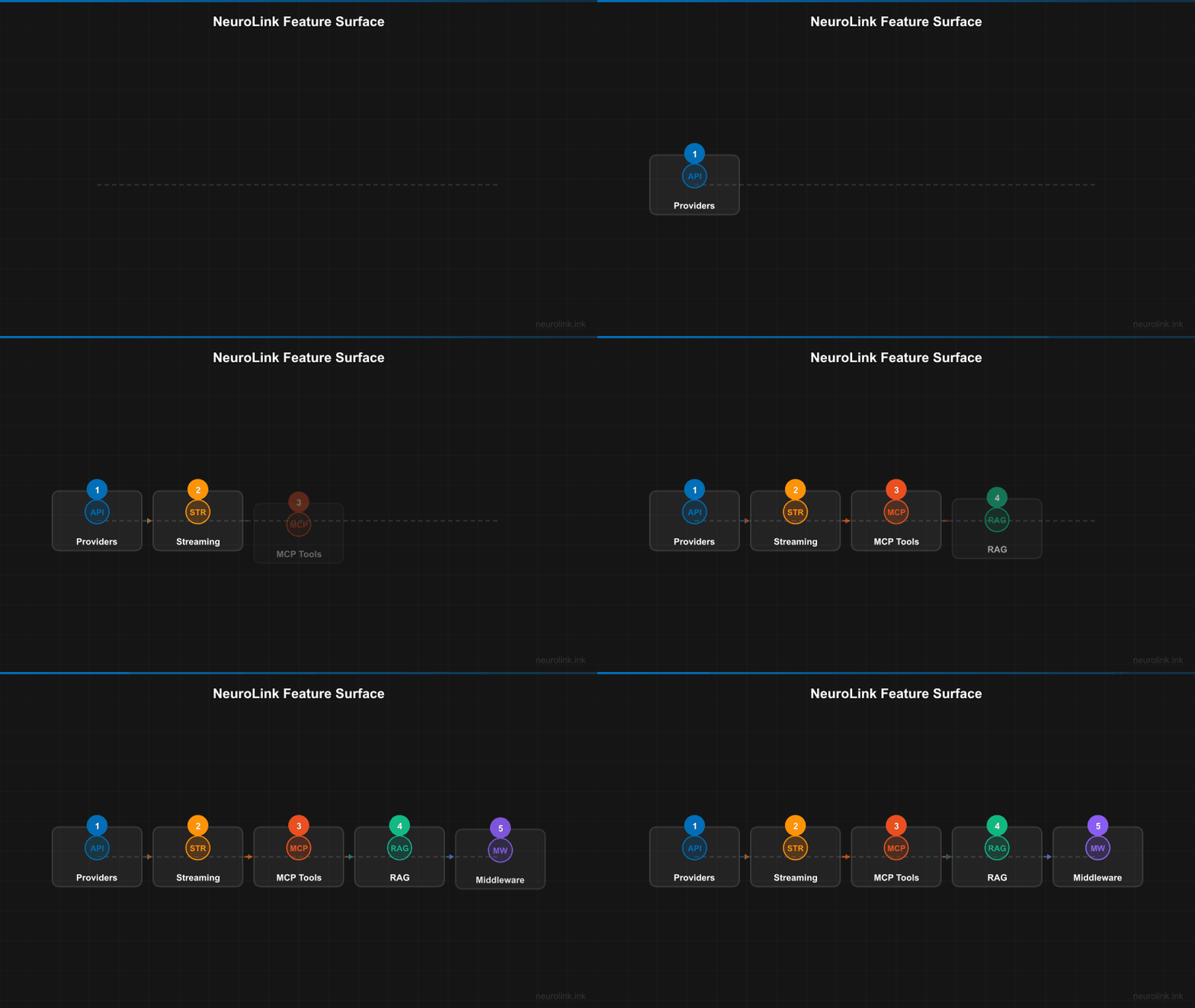
- The full feature surface: providers, MCP tools, streaming, RAG, workflows, and server adapters
- How NeuroLink compares to building direct provider integrations
- When and why to choose NeuroLink for your next project
The Problem NeuroLink Solves
Building production AI applications today means wrestling with fragmentation at every level.
Provider Fragmentation
OpenAI, Anthropic, Google, and AWS each ship their own SDKs with their own type systems, their own error hierarchies, and their own streaming protocols. A team that starts with OpenAI and later needs Anthropic for its longer context windows or Google for its cost-effective Gemini Flash models faces a significant rewrite – not because the business logic changed, but because the plumbing is different.
Vendor Lock-In
Once you have built your application around a specific provider’s SDK, switching is expensive. The deeper the integration, the higher the switching cost. This creates a dependency that limits your ability to respond to pricing changes, performance improvements from competitors, or outages from your primary provider.
Missing Enterprise Features
Most provider SDKs are designed for demos and prototypes. Getting to production requires bolting on retry logic, fallback mechanisms, observability, rate limiting, security guardrails, and conversation memory. These are cross-cutting concerns that every serious AI application needs, yet no single provider SDK offers them.
Tool Ecosystem Fragmentation
AI models increasingly need to interact with external tools – databases, file systems, APIs, code execution environments. But LangChain has its own tool format, OpenAI has function calling, and Anthropic has tool use. There is no standard way to define a tool once and use it everywhere. The Model Context Protocol (MCP) changes this, and NeuroLink supports it natively.
The Production Gap
Demos work. Production is hard. The gap between a working prototype and a production-ready AI application is filled with rate limiting, conversation persistence, monitoring, security approvals, and operational tooling. NeuroLink bridges that gap.
Core Architecture
NeuroLink’s architecture is built around a few key principles: a single entry point, a provider abstraction layer, and type safety throughout.
Single Entry Point
The NeuroLink class is the main SDK interface. Everything flows through it:
1
2
3
4
5
6
7
8
9
10
11
12
import { NeuroLink } from '@juspay/neurolink';

const neurolink = new NeuroLink();

// Works with any of 13+ providers -- just change the provider string
const result = await neurolink.generate({
  input: { text: 'Explain quantum computing' },
  provider: 'vertex',
  model: 'gemini-3-flash'
});

console.log(result.content);
Note: Model names and IDs in code examples reflect versions available at time of writing. Model availability, naming conventions, and pricing change frequently. Always verify current model IDs with your provider’s documentation before deploying to production.
The constructor accepts an optional NeurolinkConstructorConfig for configuring conversation memory, human-in-the-loop approval, observability, orchestration, and a tool registry. These are the only five constructor fields:
1
2
3
4
5
6
7
const neurolink = new NeuroLink({
  conversationMemory: memoryConfig,
  enableOrchestration: true,
  hitl: hitlConfig,
  toolRegistry: myToolRegistry,
  observability: observabilityConfig
});
The two primary methods are generate() for complete responses and stream() for real-time token delivery. Both accept the same unified options structure, making it trivial to switch between them.
Provider Abstraction Layer
Under the hood, NeuroLink uses an AIProviderFactory that creates providers via ProviderFactory and ProviderRegistry. Provider names are normalized, models are resolved dynamically, and environment variables are auto-detected so that configuration is minimal.
13 Supported Providers
NeuroLink supports providers across every deployment model through its AIProviderName enum:
Cloud Providers:
- AWS Bedrock
- AWS SageMaker
- Google Vertex AI
- Google AI Studio
- Azure OpenAI
API Providers:
- OpenAI
- Anthropic
- Mistral
- Hugging Face
- OpenRouter
Local Providers:
- Ollama
Proxy Providers:
- LiteLLM
- OpenAI-Compatible
Type Safety Throughout
Every interaction with NeuroLink is fully typed. GenerateOptions defines your inputs, GenerateResult defines the output. StreamOptions and StreamResult provide the same safety for streaming. This means your IDE catches misconfigurations at compile time, not at runtime in production.
flowchart TB
    App["Your Application"] --> NL["NeuroLink SDK"]

    NL --> PL["Provider Layer"]
    NL --> TL["Tool Layer (MCP)"]
    NL --> ML["Middleware Layer"]

    PL --> P1["OpenAI"]
    PL --> P2["Anthropic"]
    PL --> P3["Google Vertex"]
    PL --> P4["AWS Bedrock"]
    PL --> P5["13+ Providers"]

    TL --> T1["Filesystem"]
    TL --> T2["GitHub"]
    TL --> T3["Database"]
    TL --> T4["58+ MCP Servers"]

    ML --> M1["Analytics"]
    ML --> M2["Observability"]
    ML --> M3["Rate Limiting"]
    ML --> M4["HITL Security"]

    style App fill:#1b262c,stroke:#0f4c75,color:#fff
    style NL fill:#0f4c75,stroke:#1b262c,color:#fff
    style PL fill:#3282b8,stroke:#1b262c,color:#fff
    style TL fill:#3282b8,stroke:#1b262c,color:#fff
    style ML fill:#3282b8,stroke:#1b262c,color:#fff
Key Features Deep Dive
NeuroLink is not just a provider wrapper. It is a full AI development platform. Here is a tour of its feature surface.
Multi-Provider Generation
The generate() method is the simplest way to get an AI response. Specify a provider and model, and you get back a typed GenerateResult with content, usage metrics, and metadata:
1
2
3
4
5
6
7
8
const result = await neurolink.generate({
  input: { text: 'Explain quantum computing' },
  provider: 'openai',
  model: 'gpt-4o'
});

console.log(result.content);
console.log(`Tokens: ${result.usage?.total}`);
Streaming
For real-time interfaces like chatbots, stream() delivers tokens as they arrive. The result.stream async iterator works identically across all 13 providers, regardless of whether the underlying protocol uses SSE, WebSocket, or HTTP chunking:
1
2
3
4
5
6
7
8
9
10
const result = await neurolink.stream({
  input: { text: 'Write a haiku about TypeScript' },
  provider: 'anthropic',
  model: 'claude-sonnet-4-5-20250929',
  temperature: 0.7
});

for await (const chunk of result.stream) {
  process.stdout.write(chunk);
}
Structured Output
When you need validated JSON output, pass a Zod schema to the schema option. NeuroLink handles the schema conversion for each provider and validates the response:
1
2
3
4
5
6
7
8
9
10
11
12
13
14
15
import { z } from 'zod';

const ProductSchema = z.object({
  name: z.string(),
  price: z.number(),
  category: z.string()
});

const result = await neurolink.generate({
  input: { text: 'Extract: iPhone 16 Pro costs $999 in electronics' },
  provider: 'openai',
  model: 'gpt-4o',
  schema: ProductSchema,
  output: { format: 'structured' }
});
MCP Tool Integration
NeuroLink supports 58+ external MCP (Model Context Protocol) servers. Tools are discovered automatically and executed during generation without manual wiring:
1
2
3
4
5
6
7
8
9
10
11
12
13
14
15
16
17
import { NeuroLink } from '@juspay/neurolink';

const neurolink = new NeuroLink();

// Discover tools available through MCP
const tools = await neurolink.getAvailableTools();
console.log(`Found ${tools.length} tools`);

// Tools are used automatically during generation
const result = await neurolink.generate({
  input: { text: 'Read the README.md file and summarize it' },
  provider: 'openai',
  model: 'gpt-4o'
});

console.log(result.content);
console.log('Tools used:', result.toolsUsed);
RAG (Retrieval-Augmented Generation)
NeuroLink includes a complete RAG pipeline with document loading, 10 chunking strategies, embedding, and retrieval. You can use the full RAGPipeline class or the inline rag option for quick queries:
1
2
3
4
5
6
7
8
9
10
11
12
13
14
15
import { loadDocument, RAGPipeline } from '@juspay/neurolink';

// Load and process a document
const doc = await loadDocument('./docs/guide.md');
await doc.chunk({ strategy: 'markdown', config: { maxSize: 1000 } });

// Build a RAG pipeline
const pipeline = new RAGPipeline({
  embeddingModel: { provider: 'openai', modelName: 'text-embedding-3-small' },
  generationModel: { provider: 'openai', modelName: 'gpt-4o-mini' }
});

await pipeline.ingest(['./docs/*.md']);
const response = await pipeline.query('What are the key features?');
console.log(response.answer);
The ChunkerRegistry supports character, sentence, markdown, recursive, semantic, HTML, JSON, LaTeX, and token-based chunking strategies.
Conversation Memory
NeuroLink supports Redis-based persistence for conversation history and Mem0 integration for long-term user memory. This means your chatbots remember context across sessions without you managing state manually.
Workflow Engine
The workflow engine enables multi-model ensembles. Use consensus workflows to get the best answer from multiple models, fallback workflows for reliability, or adaptive workflows that route by task complexity:
1
2
3
4
5
6
7
8
9
10
11
12
import { NeuroLink, CONSENSUS_3_WORKFLOW } from '@juspay/neurolink';

const neurolink = new NeuroLink();

const result = await neurolink.generate({
  input: { text: 'Explain quantum computing' },
  workflowConfig: CONSENSUS_3_WORKFLOW,
});

console.log('Best response:', result.content);
console.log('Selected model:', result.workflow?.selectedModel);
console.log('Total time:', result.workflow?.metrics?.totalTime);
Human-in-the-Loop (HITL)
For regulated industries, NeuroLink supports approval workflows with confidence thresholds. Actions flagged as dangerous require human approval before execution, configured through the dangerousActions field in your HITL configuration.
Server Adapters
Expose your NeuroLink instance as a fully-featured HTTP API with a single function call. Supported frameworks include Hono, Express, Fastify, and Koa:
1
2
3
4
5
6
7
8
9
10
11
12
13
import { NeuroLink } from '@juspay/neurolink';
import { createServer } from '@juspay/neurolink/server';

const neurolink = new NeuroLink();

const server = await createServer(neurolink, {
  framework: 'hono',
  config: { port: 3000 }
});

await server.initialize();
await server.start();
// Now accessible at http://localhost:3000
Observability
OpenTelemetry and Langfuse integration provide distributed tracing and monitoring for every AI call. You get visibility into latency, token usage, error rates, and tool execution without writing custom instrumentation.
Provider Fallback
createAIProviderWithFallback() configures automatic failover between providers. If your primary provider goes down, requests are routed to the fallback without any changes to your application code.
Multimodal Support
NeuroLink handles images, PDFs, CSV, and video file inputs. It also supports TTS audio output, video generation via Veo, and PPT generation – all through the same unified API.
CLI
The neurolink command-line tool handles model management, MCP server management, and Ollama setup, giving you operational control without leaving the terminal.
The NeuroLink API Surface
The public API is organized around clear responsibilities. Here are the main exports from @juspay/neurolink:
Primary Class:
NeuroLink– the main SDK interface withgenerate()andstream()
Factory Functions:
createAIProvider()– create a specific provider instancecreateAIProviderWithFallback()– primary + fallback provider paircreateBestAIProvider()– auto-select based on available API keys
MCP Ecosystem:
initializeMCPEcosystem()– bootstrap the MCP tool systemexecuteMCP()– execute a specific MCP toollistMCPs()– list available MCP servers
RAG:
MDocument,loadDocument()– document loading and processingRAGPipeline,ChunkerRegistry– full retrieval-augmented generation
Workflows:
CONSENSUS_3_WORKFLOW,FAST_FALLBACK_WORKFLOW,runWorkflow()– multi-model orchestration
Server:
createServer()from@juspay/neurolink/server– HTTP API adapters
Middleware:
MiddlewareFactory,createAnalyticsMiddleware()– request/response processing
Observability:
initializeOpenTelemetry(),shutdownOpenTelemetry()– distributed tracing
How It Compares to Direct Integrations
Here is a practical comparison between using direct provider SDKs and using NeuroLink:
| Concern | Direct Provider SDK | NeuroLink |
|---|---|---|
| Lines of code per provider | 50-100+ | 5-10 (same for all) |
| Switching providers | Full rewrite | Change one string |
| Retry/fallback | Build yourself | Built-in |
| Tool support | Provider-specific format | MCP standard (58+ servers) |
| Observability | Instrument manually | OpenTelemetry + Langfuse |
| Streaming normalization | Handle per provider | Unified async iterator |
| Type safety | Varies by SDK | Full TypeScript coverage |
| Conversation memory | Build yourself | Redis + Mem0 integration |
| Server endpoints | Build yourself | createServer() one-liner |
The core trade-off is clear: a direct SDK gives you maximum control over a single provider, while NeuroLink gives you a production-ready abstraction over all of them. For teams building AI features (not AI infrastructure), NeuroLink eliminates months of integration work.
sequenceDiagram
    participant App as Application
    participant NL as NeuroLink
    participant PF as ProviderFactory
    participant AI as AI Provider
    participant MCP as MCP Tools

    App->>NL: generate({ input, provider, model })
    NL->>PF: createProvider(provider, model)
    PF-->>NL: AIProvider instance
    NL->>MCP: getAvailableTools()
    MCP-->>NL: Tool definitions
    NL->>AI: Generate with tools
    AI-->>NL: Response + tool calls
    NL->>MCP: Execute tool calls
    MCP-->>NL: Tool results
    NL-->>App: GenerateResult { content, usage, toolsUsed }
When to Use NeuroLink
NeuroLink is the right choice when your requirements align with one or more of these scenarios:
Multi-Provider Strategy
If you want to hedge against outages and pricing changes, NeuroLink lets you configure multiple providers and switch between them with a config change. No rewrite required.
Rapid Prototyping
Want to try GPT-4o, Claude Sonnet, and Gemini Flash on the same prompt? With NeuroLink, you change one string. No need to install three separate SDKs, learn three different APIs, or manage three sets of types.
Enterprise Requirements
If your organization needs human-in-the-loop approvals, OpenTelemetry observability, Redis-backed conversation memory, or rate limiting, NeuroLink provides these out of the box. Building them from scratch on top of a raw provider SDK is weeks of work.
Tool-Augmented AI
The MCP ecosystem gives your AI models access to 58+ tool servers – file systems, databases, GitHub, Slack, and more. NeuroLink discovers and executes these tools automatically during generation.
Production Deployments
Server adapters for Hono, Express, Fastify, and Koa mean you can expose your AI capabilities as HTTP APIs in minutes. Add rate limiting, caching, and middleware with a few lines of configuration.
mindmap
  root((NeuroLink))
    Providers
      OpenAI
      Anthropic
      Google Vertex
      AWS Bedrock
      Azure OpenAI
      Ollama
      +7 more
    Tools
      MCP Protocol
      58+ Servers
      Custom Tools
    Features
      Streaming
      Structured Output
      RAG Pipeline
      Conversation Memory
      Workflow Engine
    Enterprise
      HITL Security
      Observability
      Server Adapters
      Middleware
What’s Next
Now you know what NeuroLink is and why it exists. The big idea is simple: one SDK, any AI provider, no rewrites. Whether you want to build a chatbot, a document pipeline, or a full production API, the same tools work across the board.
Ready to try it yourself? Here is where to go next:
- Get hands-on: Follow Getting Started with NeuroLink: Your First AI App in 5 Minutes to write your first generate call.
- See the breadth: Check out NeuroLink Quickstart: 10 Things You Can Build Today for ten copy-paste-ready examples.
- Go deeper: Read the provider-specific guides starting with the OpenAI Integration Guide.
- Explore tools: Learn about MCP Tools Integration to connect your AI models to external capabilities.
NeuroLink is MIT licensed, and contributions are welcome. Star the repo on GitHub, open a discussion, or submit a pull request. The future of AI development is unified, type-safe, and open source.
Related posts: